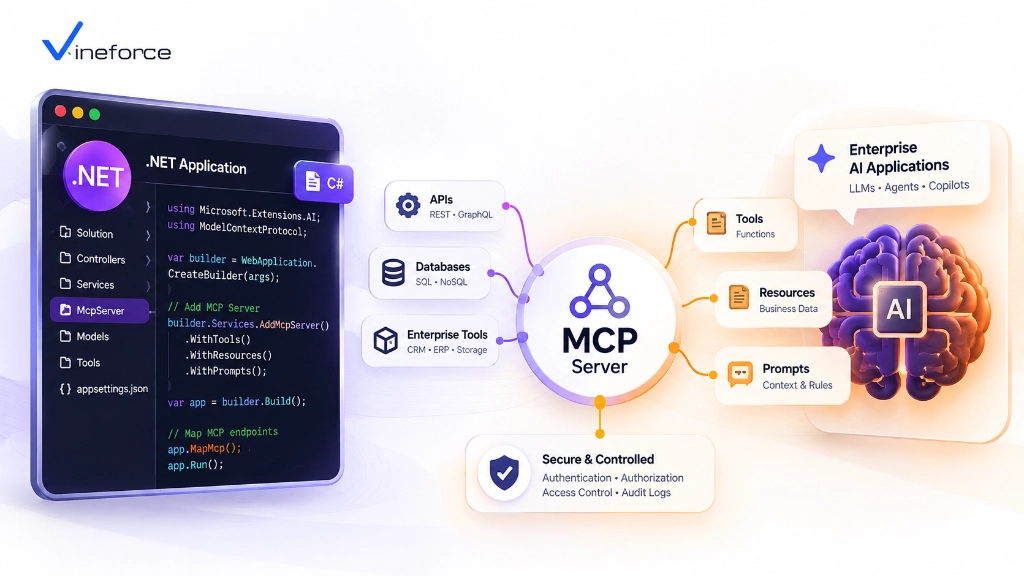
How to Build an MCP Server with .NET for Enterprise AI Applications
- Harsh Gupta
- 11 Sep, 2026
- 05 Mins read
- .NET , Architecture , AI
A lot of teams building MCP servers reach for Python first — the ecosystem around AI tooling there is mature and the examples are everywhere. But if your core business application already runs on .NET, there’s a strong case for staying in the same stack. You get to reuse your existing C# domain services, your Entity Framework Core repositories, your Entra ID middleware, and your Azure deployment pipelines. There’s no greenfield rewrite. You’re just adding a new gateway on top of code that already works.
Quick Summary: Building an enterprise MCP server using ASP.NET Core allows developers to leverage existing .NET application logic, Entity Framework Core repositories, Dependency Injection, and Azure authentication middleware. By wrapping existing service boundaries into standardized MCP tools, software architects create high-throughput, secure gateways for AI assistants.
Table of Contents
Open Table of Contents
- The Case for .NET in Enterprise AI Integration
- .NET MCP Architecture Overview
- Designing the ASP.NET Core MCP Server Stack
- Database Integration with Entity Framework Core
- Authentication & Authorization Middleware
- Configuration & Azure Secret Management
- Production Deployment: Azure Container Apps & App Service
- Frequently Asked Questions (FAQ)
- Conclusion
The Case for .NET in Enterprise AI Integration
Enterprise software built on .NET tends to have years of domain logic, SQL Server integration patterns, and security middleware that can’t just be abandoned. Building your MCP server in .NET means that logic stays in place:
- Reuse of Existing Business Logic: Inject your existing C# domain services, validators, and data mappers directly into MCP tool handlers. No reimplementation in a different language.
- Performance That Scales: .NET 9 brings measurable performance improvements — Native AOT compilation, high-throughput Minimal APIs, and low-allocation JSON parsing through
System.Text.Json. For AI workloads where tool response latency directly affects user experience, these matter. - Security Your Team Already Knows: Microsoft Entra ID, OAuth 2.0 Bearer authentication, and Azure Key Vault are all first-class citizens in the ASP.NET Core middleware stack.
Before diving into the implementation, our overview on what Model Context Protocol (MCP) is covers the protocol concepts you’ll need.
.NET MCP Architecture Overview
A .NET MCP server sits between the external AI application (MCP Host) and your internal domain infrastructure, acting as the only point of contact an LLM ever has with your data:
[ AI Host / Client ]
        |
        |  JSON-RPC 2.0 over HTTP-SSE / WebSockets
        v
+-------------------------------------------------------------+
|                     ASP.NET Core Web API                    |
|                                                             |
|   +-------------------+    +----------------------------+   |
|   | Auth Middleware   | -> | MCP Transport Controller   |   |
|   +-------------------+    +----------------------------+   |
|                                         |                   |
|                                         v                   |
|                            +------------------------+       |
|                            | MCP Tool Router        |       |
|                            +------------------------+       |
|                                         |                   |
+-----------------------------------------|-------------------+
                                          | (Scoped DI)
                    +---------------------+---------------------+
                    |                                           |
                    v                                           v
       +-------------------------+                 +------------------------+
       | EF Core DB Context      |                 | External REST Client   |
       | (Read-Only Azure SQL)   |                 | (Internal Microservice)|
       +-------------------------+                 +------------------------+
Designing the ASP.NET Core MCP Server Stack
1. Project Structure & Minimal API Setup
Start with a clean ASP.NET Core Web API project targeted for .NET 9:
dotnet new webapi -n Enterprise.McpServerKeep the project layered from the start — it pays off when tool count grows:
Enterprise.McpServer/
├── Controllers/         # MCP Transport endpoints (JSON-RPC)
├── Services/            # Business logic wrappers
├── Tools/               # MCP Tool schemas & handlers
├── Infrastructure/      # EF Core DbContext & Azure Key Vault
└── Program.cs           # DI registration & pipeline configuration
2. Tool Registration & Reflection Engine
Use C# attributes to expose methods as discoverable MCP tools with JSON Schema generation:
// Definition of a strongly typed MCP Tool in C#
[AttributeUsage(AttributeTargets.Method)]
public class McpToolAttribute : Attribute
{
    public string Name { get; }
    public string Description { get; }

    public McpToolAttribute(string name, string description)
    {
        Name = name;
        Description = description;
    }
}

public class CustomerMcpTools
{
    private readonly ICustomerService _customerService;

    public CustomerMcpTools(ICustomerService customerService)
    {
        _customerService = customerService;
    }

    [McpTool("get_customer_profile", "Fetches customer metadata and support tier by Customer ID.")]
    public async Task<CustomerProfileDto> GetCustomerProfileAsync(string customerId)
    {
        ArgumentException.ThrowIfNullOrWhiteSpace(customerId);
        return await _customerService.GetProfileByIdAsync(customerId);
    }
}
3. Dependency Injection (DI) Lifecycle
Register tool classes and their underlying dependencies in Program.cs:
var builder = WebApplication.CreateBuilder(args);

// Add infrastructure services
builder.Services.AddDbContext<ReadOnlyDbContext>(options =>
    options.UseSqlServer(builder.Configuration.GetConnectionString("AzureSqlReadOnly")));

builder.Services.AddScoped<ICustomerService, CustomerService>();

// Register Tool Handlers
builder.Services.AddScoped<CustomerMcpTools>();

var app = builder.Build();
Database Integration with Entity Framework Core
For read-heavy MCP tool handlers, use EF Core’s AsNoTracking() to avoid change-tracking overhead on every query:
public class CustomerService : ICustomerService
{
    private readonly ReadOnlyDbContext _db;

    public CustomerService(ReadOnlyDbContext db)
    {
        _db = db;
    }

    public async Task<CustomerProfileDto?> GetProfileByIdAsync(string customerId)
    {
        return await _db.Customers
            .AsNoTracking() // Prevent change-tracking allocation overhead
            .Where(c => c.Id == customerId)
            .Select(c => new CustomerProfileDto(c.Id, c.Name, c.Tier, c.Status))
            .FirstOrDefaultAsync();
    }
}
For safety guidelines around connecting relational databases to AI tools, our guide on connecting SQL Server to AI using MCP covers read-only credential setup, tool whitelisting, and parameterized query patterns.
Authentication & Authorization Middleware
Your MCP server endpoints need to validate Entra ID JWT tokens before any tool handler runs:
builder.Services.AddAuthentication(JwtBearerDefaults.AuthenticationScheme)
    .AddMicrosoftIdentityWebApi(builder.Configuration.GetSection("AzureAd"));

builder.Services.AddAuthorization(options =>
{
    options.AddPolicy("McpAccessPolicy", policy =>
        policy.RequireClaim("scp", "Mcp.Tools.ReadWrite"));
});

// Enforce authentication on MCP endpoints
app.MapPost("/mcp/v1/rpc", async (HttpContext context, McpRouter router) =>
{
    return await router.HandleRequestAsync(context);
}).RequireAuthorization("McpAccessPolicy");
Configuration & Azure Secret Management
Connection strings and API keys don’t belong in config files checked into source control. Load them from Azure Key Vault at startup using Managed Identity:
if (builder.Environment.IsProduction())
{
    var keyVaultUri = new Uri(builder.Configuration["AzureKeyVault:Endpoint"]!);
    builder.Configuration.AddAzureKeyVault(keyVaultUri, new DefaultAzureCredential());
}
If you hit issues with Key Vault reference resolution on Azure App Service, our troubleshooting guide on fixing Azure App Service Key Vault reference identity issues covers a common misconfiguration that trips up a lot of teams.
Production Deployment: Azure Container Apps & App Service
Package your .NET MCP server as a container for flexible Azure deployment:
# Multi-stage Dockerfile for ASP.NET Core MCP Server
FROM mcr.microsoft.com/dotnet/aspnet:9.0 AS base
WORKDIR /app
EXPOSE 8080

FROM mcr.microsoft.com/dotnet/sdk:9.0 AS build
WORKDIR /src
COPY ["Enterprise.McpServer.csproj", "./"]
RUN dotnet restore
COPY . .
RUN dotnet publish -c Release -o /app/publish /p:UseAppHost=false

FROM base AS final
WORKDIR /app
COPY --from=build /app/publish .
ENTRYPOINT ["dotnet", "Enterprise.McpServer.dll"]
Azure Container Apps is worth considering over App Service for MCP microservices specifically because it scales to zero when idle. If your AI tool usage is bursty — heavy during business hours, quiet overnight — you stop paying for idle compute without any manual scaling configuration.
To learn how Vineforce’s engineering team approaches end-to-end AI data integration, explore Vineforce AI Database Integration Solutions.
Frequently Asked Questions (FAQ)
Why build an MCP server using .NET and C#?
ASP.NET Core provides enterprise-grade performance, high-throughput Minimal APIs, native Dependency Injection, robust middleware for Entra ID authentication, and seamless integration with existing .NET microservices and SQL Server databases.
How does Dependency Injection (DI) work inside a .NET MCP server?
MCP tool handlers register with the standard ASP.NET Core IServiceCollection. When an MCP client invokes a tool call, the server resolves database contexts (EF Core), repositories, and HTTP clients within a scoped execution pipeline.
Can a .NET MCP server transport messages over HTTP with Server-Sent Events (SSE)?
Yes. While stdio transport is common for local desktop integrations, enterprise remote MCP servers hosted on Azure typically use HTTP with Server-Sent Events (SSE) or WebSockets over JSON-RPC 2.0.
How should configuration and database secrets be managed in a .NET MCP service?
Use standard .NET configuration providers (IConfiguration) combined with Azure Key Vault secrets and Azure App Configuration to keep connection strings and API keys out of repository source code.
Conclusion
Building an MCP server in .NET is largely a matter of wiring what you already have — your existing services, repositories, and authentication middleware — into a new JSON-RPC transport layer. The protocol is straightforward; the real work is in tool design (what you expose and how you scope it) and in getting security right from day one.
If you need help designing the server architecture or want a second opinion on tool boundaries and security controls, Vineforce builds this stack for enterprise .NET shops regularly.