How to Build a Secure MCP Server for Enterprise Applications
- Harsh Gupta
- 11 Sep, 2026
- 05 Mins read
- Security , Enterprise , AI
When you connect an LLM to enterprise backends, you’re not just exposing data — you’re adding a new execution path into your systems that didn’t exist before. That path needs the same controls as any other: identity verification, authorization checks, input sanitization, and audit logging. Model Context Protocol (MCP) defines the messaging layer; it says nothing about who’s allowed to call what or what happens to the results. The security model is entirely your responsibility to build.
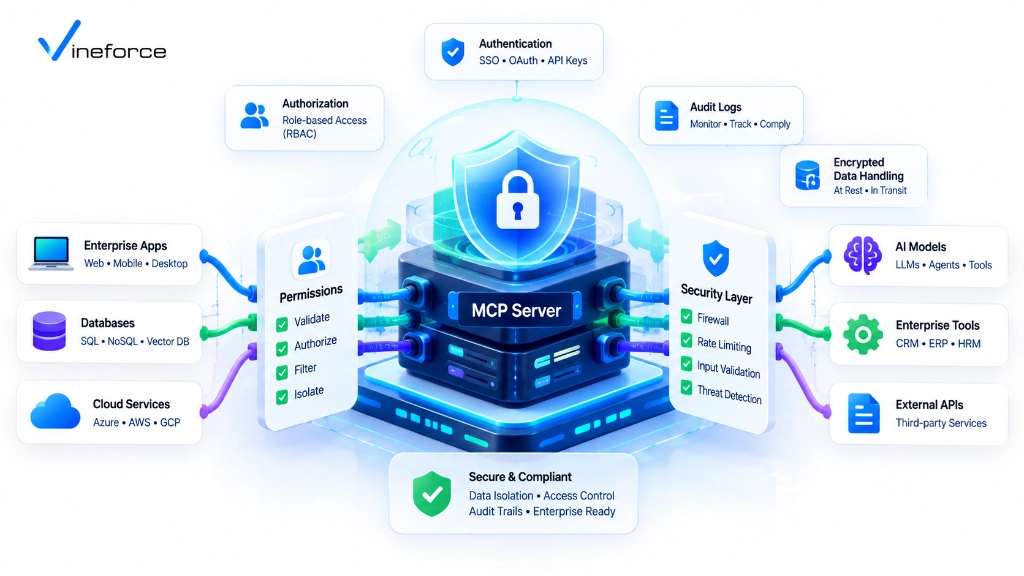
Quick Summary: Model Context Protocol (MCP) is not inherently secure by default. Security is an architectural implementation responsibility. To build an enterprise-ready MCP server, organizations must layer Microsoft Entra ID authentication, tool-level authorization, least-privilege SQL Server database connections, parameterized input validation, Azure Key Vault secret isolation, and comprehensive audit logging around the MCP layer.
Table of Contents
Open Table of Contents
The Threat Model for MCP Integrations
Connecting AI agents to backend systems introduces attack vectors that traditional API security wasn’t designed for:
[ Attacker / Malicious Prompt ]
              |
              v (Indirect Prompt Injection)
     [ LLM Processing Engine ]
              |
              v (Generates Malicious Tool Arguments)
    +------------------------------------+
    | Insecure MCP Server                |
    |  ❌ Unvalidated SQL parameter       | ---> [ SQL Server ] (Data Exfiltration)
    |  ❌ Unchecked API user identity    | ---> [ REST API ]   (Unauthorized Action)
    +------------------------------------+
Three threats dominate in practice:
- Indirect Prompt Injection: Malicious instructions embedded in unstructured data — emails, PDFs, support ticket bodies — that trick the LLM into invoking destructive or unauthorized MCP tools.
- Privilege Escalation: An unprivileged end-user using an AI interface to trigger an MCP tool that accesses executive financial data or admin-level APIs they wouldn’t normally reach.
- Data Exfiltration via Unbounded Queries: Tools that return raw
SELECT *datasets, putting PII or secrets into the LLM’s context buffer where they can surface in a response.
For baseline protocol architecture context before auditing security layers, our introduction to what Model Context Protocol (MCP) is covers how the client-server model works.
Crucial Clarification: Protocol vs. Infrastructure Security
IMPORTANT: Never assume that adopting MCP automatically makes your application secure, HIPAA compliant, or GDPR compliant.
MCP is a communications protocol specification — it defines message schemas (JSON-RPC 2.0) for tools, prompts, and resources. MCP does not contain built-in firewall rules, access control lists, or database encryption. Every security feature — from authentication tokens to database isolation — must be built around the MCP server by your engineering and platform security teams.
Enterprise Security Pillars for MCP Servers
1. User Authentication (Microsoft Entra ID)
Remote MCP servers deployed as cloud microservices must require authenticated Bearer tokens issued by your enterprise identity provider. Unauthenticated calls should be rejected before any tool handler runs:
// ASP.NET Core Middleware validating Entra ID Jwt Bearer tokens
public void ConfigureSecurity(IServiceCollection services, IConfiguration config)
{
    services.AddAuthentication(JwtBearerDefaults.AuthenticationScheme)
        .AddMicrosoftIdentityWebApi(options =>
        {
            config.Bind("AzureAd", options);
            options.Events = new JwtBearerEvents
            {
                OnTokenValidated = context =>
                {
                    // Inspect token claims and user Principal Name (UPN)
                    return Task.CompletedTask;
                }
            };
        }, options => { config.Bind("AzureAd", options); });
}
2. Tool-Level Authorization & Policy Enforcement
Authentication confirms who the user is. Authorization determines which tools they’re allowed to run. Don’t assume a valid token means access to everything:
public class PolicyAuthorizer
{
    public bool IsAuthorized(ClaimsPrincipal user, string toolName)
    {
        return toolName switch
        {
            "get_financial_summary" => user.IsInRole("FinanceExecutive"),
            "search_knowledgebase"  => user.Identity?.IsAuthenticated == true,
            "restart_app_service"   => user.HasClaim("devops_admin", "true"),
            _ => false
        };
    }
}
3. Least Privilege & Read-Only Data Layers
Database connections consumed by your MCP server must use roles restricted to what each tool actually needs. If a tool generates reports, db_datareader on specific schemas is sufficient — not db_owner. For step-by-step SQL Server credential setup and query scoping, our architectural guide on connecting SQL Server to AI using MCP covers this in detail.
4. Parameterized Input Validation & Schema Sanitization
Every MCP tool must define strict JSON Schema parameter specifications. Before any C# or database handler runs, validate string arguments against known patterns:
public record SearchInput(string Query, int MaxResults);

public static class Validator
{
    public static void Validate(SearchInput input)
    {
        if (input.MaxResults is < 1 or > 50)
            throw new ArgumentOutOfRangeException(nameof(input.MaxResults), "MaxResults must be between 1 and 50.");

        if (Regex.IsMatch(input.Query, @";|--|DROP|UPDATE|DELETE", RegexOptions.IgnoreCase))
            throw new InvalidOperationException("Illegal characters detected in search query.");
    }
}
5. Secret Management (Azure Key Vault)
Connection strings, API keys, and certificates consumed by the MCP service must never be stored in configuration files or deployment artifacts. Retrieve them from Azure Key Vault at runtime using Managed Identity. If you hit problems with Key Vault references not resolving on Azure App Service, our troubleshooting guide on configuring keyVaultReferenceIdentity in Azure App Service covers the specific property that causes most of those failures.
6. Immutable Audit Logging & Observability
Log every MCP JSON-RPC call with enough detail to reconstruct what happened:
- Invocation timestamp
- User ID (UPN / Object ID)
- Invoked tool name & raw input parameters
- Tool execution status (Success / Forbidden / Exception)
- Execution latency in milliseconds
Stream audit logs to Azure Sentinel or Application Insights. This isn’t optional in regulated environments — it’s how you demonstrate compliance after the fact. Our analysis on how advanced security measures safeguard SaaS applications covers related observability patterns.
Zero Trust Network & Cloud Security Topology
In enterprise cloud environments, remove your MCP server from the public internet entirely using Azure Private Endpoints:
[ User Device / Agent ]
       |
       v (HTTPS / Entra ID Authenticated Gateway)
+-------------------------------------------------------------------+
|  Azure Virtual Network (VNet)                                     |
|                                                                   |
|   [ Application Gateway / Azure API Management ]                  |
|                           |                                       |
|                           v (Private IP Endpoint)                 |
|   [ Azure Container Apps Subnet (MCP Server Microservice) ]       |
|                           |                                       |
|            +--------------+--------------+                        |
|            | (Private Link)              | (Private Link)         |
|            v                             v                        |
|   [ Azure Key Vault ]           [ Azure SQL Database ]            |
+-------------------------------------------------------------------+
With no public IP on the MCP server or database, external network probes have no entry point. The only traffic reaching your tools comes through the Application Gateway after Entra ID token validation.
Compliance Considerations (HIPAA, GDPR, SOC 2)
When AI tools process payloads containing PHI or PII — which is common in healthcare and financial SaaS — several controls are non-negotiable:
- Data Minimization: Redact PII columns before returning JSON payloads to the MCP host. The LLM does not need a full customer record to answer most business questions — give it only what the tool’s stated purpose requires.
- Data Residency: Ensure your MCP server and Azure OpenAI endpoints are deployed within the same compliant Azure geographic regions. Mixing regions can create unintended data residency violations.
- Encryption in Transit & at Rest: Force TLS 1.3 on all MCP RPC transports and enable Transparent Data Encryption (TDE) on SQL Server. These aren’t advanced settings — they’re baselines.
To review complete architecture and deployment options, explore Vineforce AI Database Integration Solutions.
Frequently Asked Questions (FAQ)
Is Model Context Protocol (MCP) inherently secure out of the box?
No. MCP is an open protocol specification for messaging. It does not enforce authentication, authorization, read-only permissions, or data encryption on its own. Enterprise security depends entirely on how the surrounding application, server handlers, identity model, and cloud infrastructure are designed.
How do you authenticate users calling an MCP server?
Remote MCP servers hosted in cloud environments should enforce OAuth 2.0 / OpenID Connect Bearer token authentication (such as Microsoft Entra ID JWTs) passed from the host application in request headers.
What is tool-level authorization in an MCP server?
Tool-level authorization evaluates the requesting user’s identity claims against specific MCP tools before execution, ensuring users can only invoke tools matching their enterprise Role-Based Access Control (RBAC) rights.
How can prompt injection attacks exploit insecure MCP tools?
Prompt injection attacks attempt to manipulate an LLM into sending malicious parameters (such as SQL injection syntax or out-of-bounds identifiers) to MCP tools. MCP servers mitigate this by validating parameters against strict JSON schemas and using parameterized queries.
Conclusion
Security for an MCP server is not a checklist to complete at the end — it’s a series of decisions baked into the architecture from the beginning: which identity provider validates tokens, which roles map to which tools, what the database connection string is allowed to do, and how every tool call gets logged. Get those decisions right up front, and you end up with an AI integration that passes security review. Add them as an afterthought, and you’re patching an exposed production system.
If you need help threat-modeling your MCP architecture, designing the authorization policy layer, or meeting specific compliance requirements for HIPAA or GDPR, Vineforce builds these systems for regulated enterprise environments.